


Introduction
Microsoft Build 2026 is underway and as expected, there were plenty of announcements across Azure, AI, Data, Security, M365 and Windows. Whilst many of the headlines focussed on AI agents and Copilot experiences, what stood out to me was the investment Microsoft continues to make. Investment in the infrastructure, platforms, governances and operational tooling needed to run these solutions at scale.
I purposely stayed quiet during the keynote, not because I didn’t enjoy the hype, but I NEED to step back. I don’t want to be reactive and share opinion before I’ve reviewed things, distilled the key findings and seen how this can impact the businesses I work with daily.
In this post, I’ll highlight some key announcements that caught my attention and share my thoughts on what they mean for Azure architects, SMBs and MSPs.
Yes - it’s focussed on Azure, but there are some exciting notable mentions in here too!
Let’s Build! 🧱
Microsoft Scout
Yes, I know this is an Azure-focussed blog, but I can’t not start with Microsoft Scout.
Microsoft Scout is the first “autopilot” agent, powered by OpenClaw. Spearheading a new category of always-on assistants, designed to proactively complete work on behalf of users; instead of waiting for prompts.
Built into Microsoft 365, Scout works across Teams, Outlook, OneDrive, Sharepoint to help co-ordinate meetings, identify risks and do the work for you.
Scout at a glance
- Always-on AI agent that proactively manages tasks.
- Operates across Microsoft 365 application using a Work IQ context.
- Built with enterprise governance, identity and compliance.
Note
Scout is available through Preview programs such as Frontier as an experimental release. It also requires GitHub Copilot licensing, and Intune configuration profiles to be deployed.
My Take
This was definitely the most interesting announcement from Build 2026. Whilst many AI tools still rely on users initiating every interaction; Scout doesn’t!
Whether organisations are ready for autonomous workplace agents is another conversation entirely. But this is definitely the way Microsoft believe the future is heading.
If Copilot helped people work with AI, Scout feels like the first view of AI working alongside people in an enterprise environment, not just OpenClaw running on a Mac mini at home!
Azure Infrastructure Resiliency Manager (Public Preview)
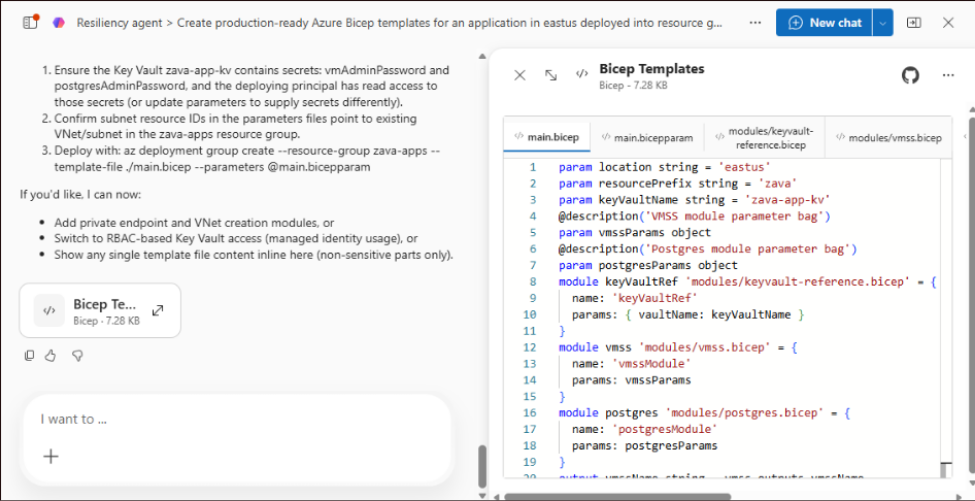
Azure Infrastructure Resiliency Manager is a new service that brings resiliency assessment, remediation, testing and monitoring into a single platform.
Instead of using Azure Advisor, Azure Monitor and a bunch of other tools; Microsoft is attempting to provide a unified experience for building/validating resilient apps.
Resiliency Manager at a Glance:
- AI-powered Resiliency Agent for architecture reviews.
- IaC generation and validation for Bicep, ARM and Terraform.
- Posture assessments across applications.
My Take
This is a strong announcement from Build 2026 in my view.
For SMBs and MSPs, I think this is really interesting because resiliency is often misunderstood as backups and disaster recovery. In reality, resilience starts at the architecture stage. Anything that makes it easier to identify weaknesses, validate designs or help test processes will help partners and providers deliver reliable platforms.
Independent Azure Files Management for Premium SSD (NFS)
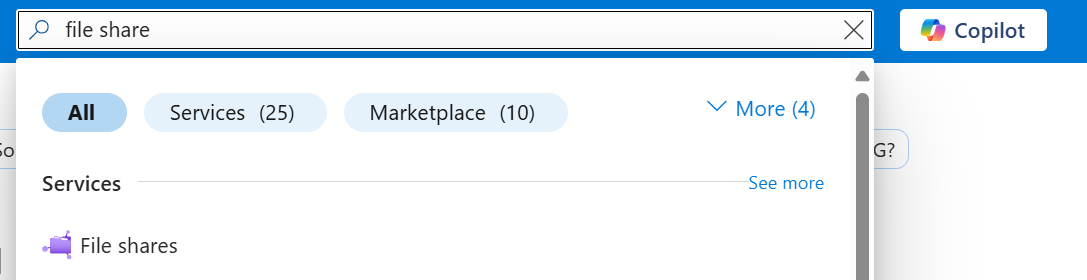
Azure Files now allows Premium SSD NFS file shares to be created, managed, secured and billed independently! This removes the prior need for a storage account.
This gives each file share its own performance, networking, security and billing controls making it easier to align storage with individual workloads.
My Take
I actually quite like this announcement - whilst not the most interesting or hyped change, it solves a good operational challenge.
Most SMBs won’t need lots of file shares, but the simplified management model and clearer cost visibility are good improvements.
For MSPs, this is great for splitting out storage for customer workloads, rather than having to manage multiple storage accounts per workload, as well as the file share.
Azure Files Entra ID Authentication for macOS (Public Preview)
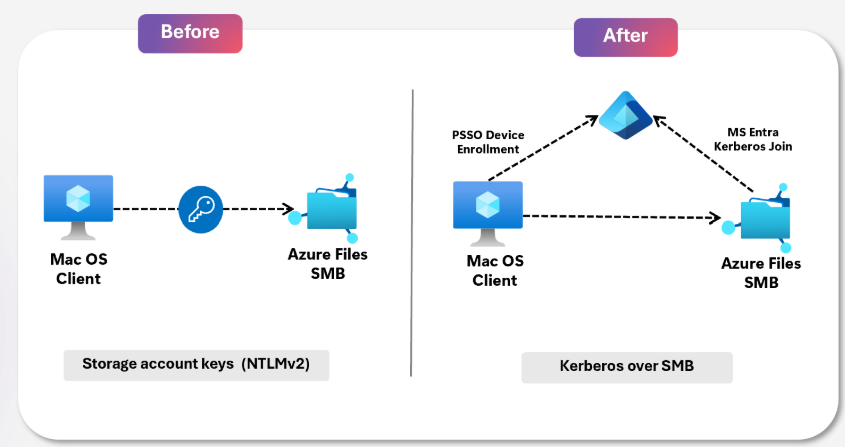
Azure Files now supports Microsoft Entra ID authentication for macOS. This allows users to access SMB file shares securely without storage account keys or traditional Active Directory services.
This brings a more consistent access experience across Windows & macOS, whilst allowing organisations to manage file access through Entra ID.
Azure Files for macOS:
- Secure Entra ID-based access to Azure Files from macOS devices.
- Removes dependency on storage account keys or traditional AD.
- Consistent identity and access controls across Windows and macOS.
My Take
A cool update for organisations running mixed-device environments. Especially for those MSPs that “don’t support macOS devices” yawn!
For SMBs and MSPs, this helps create a cleaner journey towards modern file services in Azure. The less time spent managing legacy file servers, credentials and platform-specific workarounds; the more time can be spent delivering value to customers.
Azure Cobalt 200 Virtual Machines
Microsoft have announced their next generation of ARM-based infrastructure, with “Cobalt 200” VMs. Designed to support AI workloads and continuously running services, Cobalt 200 hits huge performance improvements than Cobalt 100.
- Up to 50% better CPU performance than Cobalt 100.
- New high-memory and storage-optimised VM families.
- Improved storage IOPS and network bandwidth for demanding workloads.
My Opinion
Whilst Microsoft are definitely positioning Cobalt 200 around Agentic AI, I think the bigger story is the investment into custom silicon. Alongside the Microsoft’s own AI models, this is another step towards reducing infrastructure costs with performance improvements.
For SMBs and MSPs, most customers and businesses won’t be deploying Cobalt VMs, and they shouldn’t be. They’ll get far more value from Copilot Studio and other Microsoft AI services than worrying about Cobalt VMs for continuously running AI services.
Remember that infrastructure decisions should be driven by customer outcomes, not new VM SKUs.
Azure HorizonDB (Public Preview)
Azure HorizonDB is a new fully-managed, PostgreSQL compatible database service designed for enterprise scale and AI-driven apps. Built on a cloud native architecture, HorizonDB aims to deliver scale and performance for those large transactional workloads.
What is it?
- Fully managed PostgreSQL compatible database built for enterprise workloads.
- Massive scale-out compute and elastic storage with HA by design.
- AI-native capabilities including vector search, AI model management and Foundry integration.
My Take
This is an enterprise-focussed database offering aimed at customers building large scale applications. PostgreSQL compatibility is important, but as always, database selection should be driven by workload and business outcomes first.
For SMBs and MSPs, this is one to watch. It’s still in public preview and most customers will typically get more value from other Azure SQL PaaS/IaaS offerings than this one.
Azure Local for Small Form Factor Edge Infrastructure (Preview)
Microsoft announced a new approach for running Azure-managed infrastructure on edge hardware, bringing cloud management to physical infrastructure.
The announcement introduces a new Provisioned Machine resource, alongside Foundry Local allowing orgs to run AI models, agents and edge-case workloads locally; whilst being managed through Azure.
A quick look:
- Azure-managed Provisioned Machines bring cloud management to physical devices.
- Foundry Local enables AI models and agents to run locally.
- AKS and Azure IoT ops can now run on lightweight infrastructure.
My Take
This is quite an interesting infrastructure announcement from Build. Microsoft are extending Azure to manage edge and on-premises infrastructure. There does have to be a case made though, as M365 Local = Exchange On-Premises and AVD Local = on-premises RDS.
Obviously there are new features with the local services; but it’s amusing to compare.
For SMBs and MSPs, this isn’t about robots. The opportunity is that Azure is becoming capable of managing on-premises environments.
Windows 365 for Developers & AI Agents
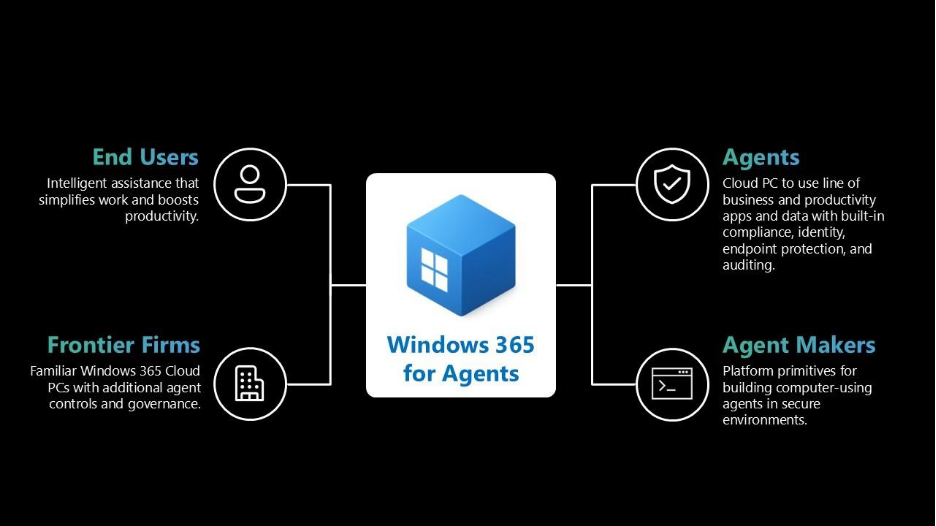
Microsoft announced several Windows 365 enhancements aimed at developers, including ready-to-code Cloud PCs. With that, this includes expanded compute options, improved management capabilities, but Windows 365 for Agents is where it’s at!
Windows 365 for Agents gives AI agents their own managed Cloud PC, allowing them to interact with desktop apps, browsers and legacy systems in a way humans would. The beauty of this is, is that it remains governed through Entra ID and Intune.
Windows 365 for Agents:
- Windows 365 for Agents is now generally available.
- AI agents can interact with desktop applications, browsers and legacy apps.
- Managed through enterprise controls like Entra and Intune.
My Take
I LOVE this announcement!
This might not be something to be deployed by MSPs or used by SMBs next week, but it’s definitely a trend that organisations should be aware of. Many businesses still rely on legacy apps.
If AI agents can safely operate those apps in a secure environment, that could unlock entirely new automation opportunities!
Notable Mentions
Microsoft Web IQ
- New AI-native search and grounding platform built specifically for AI agents, providing access to fresh web content including websites, news, images and videos using Bing's global index as the underlying data source.
- Returns structured evidence and passage-level results rather than entire documents, helping improve response quality, reduce token consumption, lower inference costs, and support more effective agent reasoning.
Foundry IQ
- Microsoft's new enterprise knowledge layer for AI agents, designed to connect organisational knowledge, business systems, documents, databases and web content into a single retrieval platform.
- Introduces serverless deployment, multi-source retrieval, enterprise-grade security and generally available Knowledge Bases to simplify the development of production-ready AI agents.
Fabric and Databases for Agentic Applications
- Microsoft is positioning Fabric, OneLake, Fabric IQ, Rayfin and Microsoft Databases as the shared data, context and application platform for building production-ready AI applications and agent ecosystems.
- New capabilities include the Rayfin application development framework, Fabric IQ general availability, expanded agent integration and deeper connections between business data, analytics, operational systems, and AI workloads.
Azure Cosmos DB Agent Memory & Agentic Retrieval Toolkits
- New developer toolkits designed to solve two of the biggest enterprise AI challenges: persistent agent memory and advanced retrieval, enabling agents to retain context, remember users and improve response quality over time.
- Built on Azure Cosmos DB with integrated vector search, full-text search, hybrid retrieval, Azure OpenAI, Foundry, Durable Functions and change feed processing capabilities.
Microsoft Execution Containers (MXC)
- New policy-driven security framework that allows organisations to securely run AI agents within isolated execution environments across Windows and Windows Subsystem for Linux (WSL).
- Provides process isolation, session isolation, governance integration with Entra ID and Intune and lays the foundation for secure autonomous agents operating across enterprise environments.
Watch the Microsoft Build 2026 Keynote
If you'd like to explore the announcements in more detail, watch the Microsoft Build 2026 keynote and browse the full collection of sessions, demos, and technical deep-dives:
🔗 https://news.microsoft.com/build-2026/
Wrap Up
For me, there were a bunch of great announcements which stood-out! Anything that helps organisations design, validate and test more effectively is a welcome addition.
Outside of Azure, Scout was the announcement that caught a huge amount of attention! It offers one of the clearest examples yet of Microsoft’s vision for always on AI agents!
What are you most excited about Build? Keen to hear the thoughts of the community!
Comments (0)
No comments yet. Your first commenter will appear here.
Leave a comment
Join the discussion
Become a member of 9to5Azure to start commenting.
Already a member? Sign in