


TL;DR
- Azure Copilot introduces a new harness, tools, skills and Spaces with visible progress and tool calls.
- The new experience returned a verified £17.60 cost breakdown and context for NSG recommendations during my testing.
- Standard Copilot currently has no charges associated - but this is subject to change.
Introduction
I am SO excited for this blog post! I recently had the opportunity to test the new Azure Copilot experience! Thanks to the Azure product team in reminding us MVPs that this new experience was available.
With a re-designed interface, new tools and skills and fundamental changes underneath; I wanted to see how it handled typical Azure tasks.
In this post, I'll compare the previous experience with the new standard Copilot agent. This will be across cost analysis and NSG investigations to see what has improved; and what this means for Azure engineers and MSPs!
Let's get into it! 💪
What Has Actually Changed in Azure Copilot?
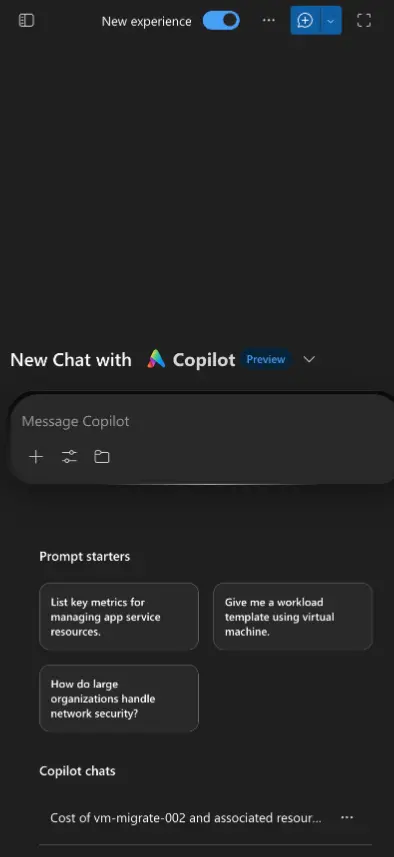
The first thing I noticed was the new logo, and the new, redesigned interface.
- Updated branding and navigation, including a new Azure Copilot logo/icon.
- A "New Experience" toggle, which allowed me to switch between versions for testing.
- Visible progress messages and tool calls, giving me information on how Copilot is processing the task.
A New Harness Underneath
The Azure Copilot product team explained that Azure Copilot has been rebuilt on the GitHub Copilot agent harness.
At a high-level, this means that the harness co-ordinates how the model works through a task. It manages the context, instructions and tools available to the agent.
The workflow that Copilot follows is as below:
- Works through the request and identifies the information it needs.
- Selects and calls required tools to investigate the Azure environment.
- Uses the results to determine the next step and build a response.
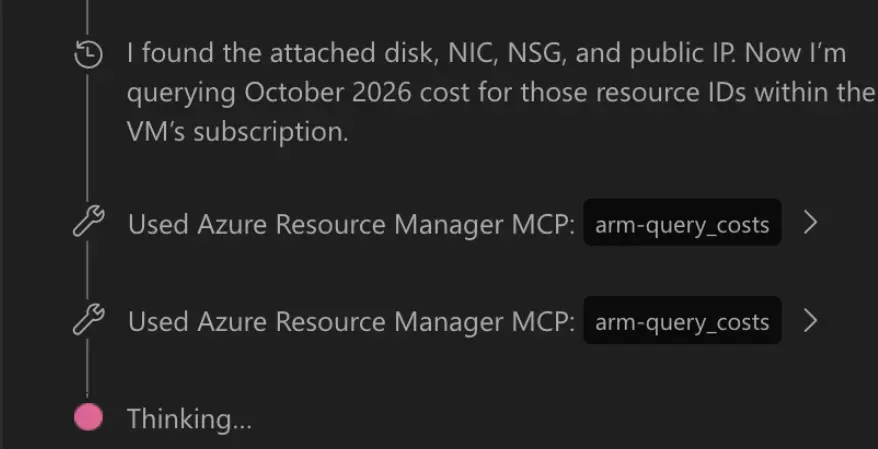
And I could see this during my cost investigation test. Copilot identified resources associated with the VM and then queried their costs. The progress messages showed me which tools it was calling along the way.
That visibility is useful! It gives me more information to assess the answer and decide what to verify. I'll walk through the results in the hands-on section.
What About the Models?
One of my first questions was which models powers the new experience. During testing, I can't see the options to select a different model or request a deeper reasoning mode.
There is more information available for the other Azure agents:
| Agent | Documented models |
|---|---|
| Azure Copilot Observability Agent | Azure OpenAI Service models. The exact model version isn't specified in its governance FAQ |
| Azure SRE Agent | Azure OpenAI GPT-5 family or Anthropic Claude family. You select the provider; the agent handles individual model selection. |
Microsoft's agent overview also lists Troubleshooting, Deployment, Optimisation, Resiliency and Migration but doesn't identify their underlying models.
To see Azure Copilot for Networking in action - see a previous blog post I wrote here:
 Using Copilot in Azure to Troubleshoot Network Issues FasterRead article
Tools, Skills and Spaces: How the New Experience Works
The tools and skills were one of the most interesting parts of this update for me! You can see more of the capabilities available to Copilot and how they support the task you've prompted.
The three concepts we will cover are Tools, Skills and Spaces.
Tools - Connecting Copilot to Azure
Tools give the agents ways to retrieve information and interact with services. Microsoft explained that the new experience uses MCP (Model Context Protocol) tools to connect these capabilities to the agent.
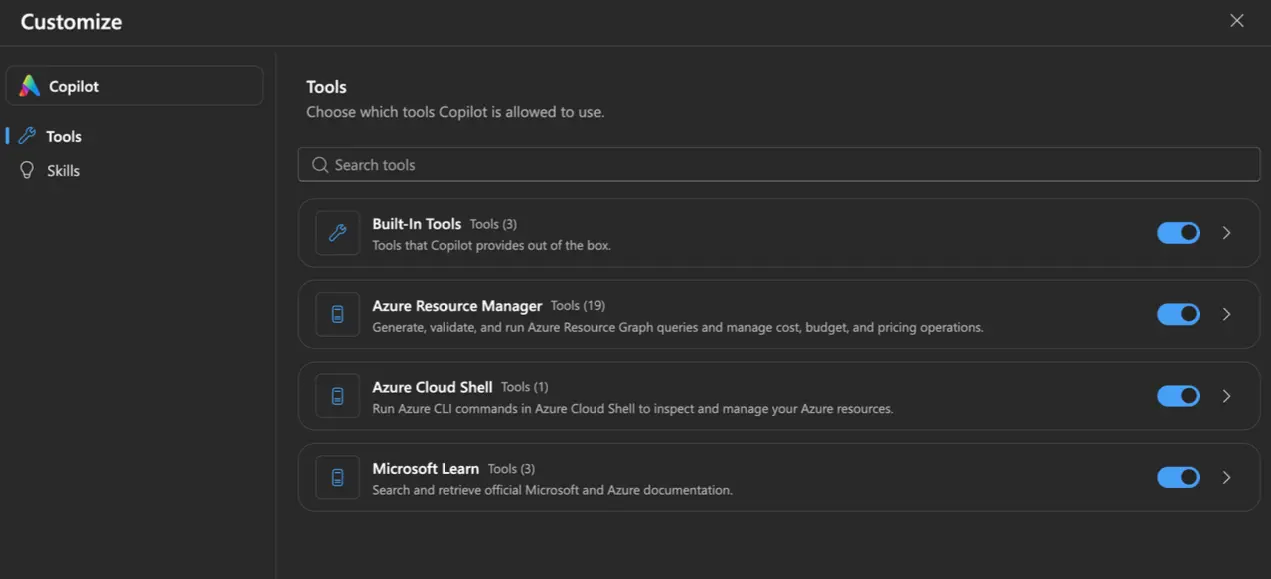
The Tools panel in my session included:
- Azure Resource Manager with tools for Graph queries, costs, budgets and pricing.
- Azure Cloud Shell to run Azure CLI commands to inspect resources.
- Microsoft Learn to search and retrieve official documentation.
Note
Tool availability still sits within Azure's access controls. Microsoft documents that Copilot always respects the user's permissions, any policies and resource locks. Enabling tools doesn't grant additional permissions.
Skills - Instructions for Specific Tasks
Skills provide reusable instructions for repeatable tasks, to ensure Copilot provides a consistent output.
Warning
It's generative AI, so consistent output is different to "the same output". Always check outputs and responses!
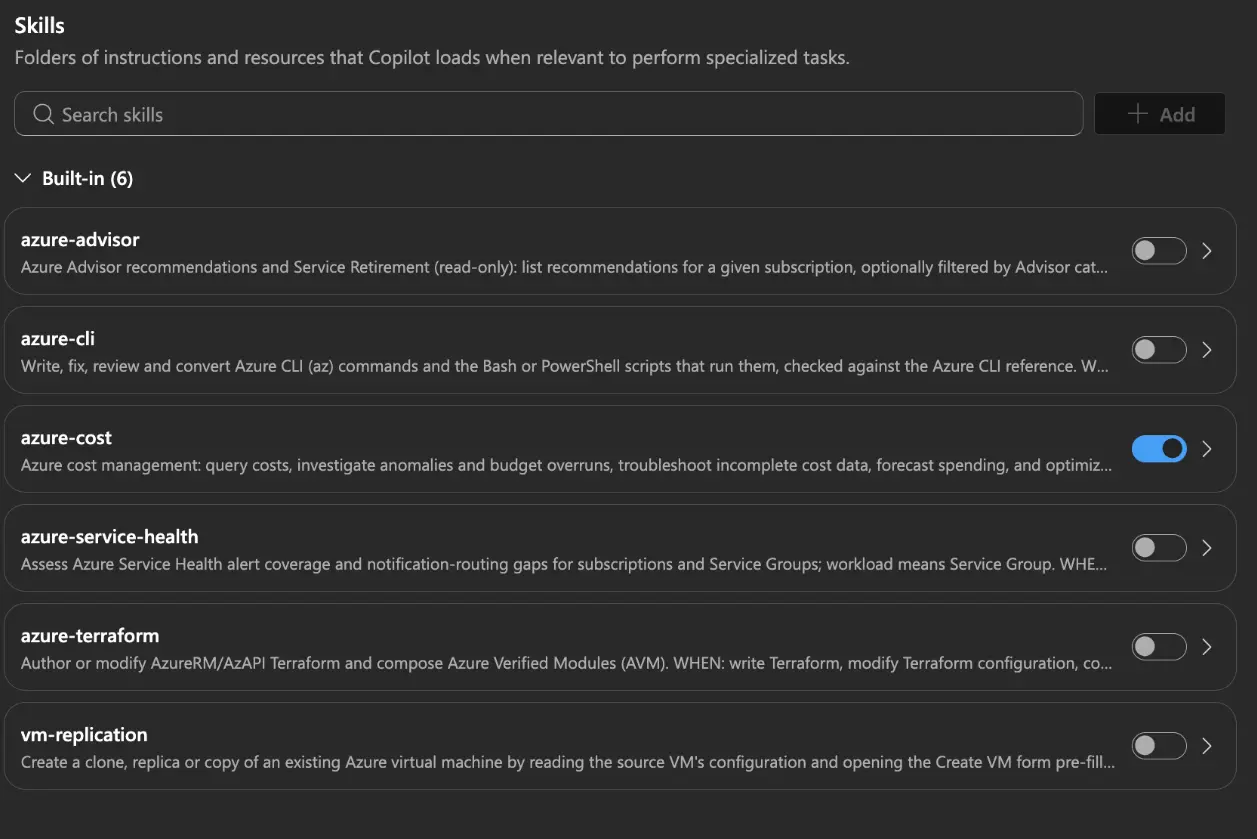
The Skills panel displayed 6 built-in skills:
- azure-advisor for recommendations and service retirement information.
- azure-cli for writing, reviewing and fixing CLI commands and scripts.
- azure-cost for cost queries, investigation, forecasting and any cost optimisations.
- azure-service-health for reviewing service health information.
- azure-terraform to author or modify Terraform configuration.
- vm-replication to prepare a VM clone!
In my captured session, azure-cost was enabled. I'll show how the cost investigation progressed in the hands-on section!
Note
One thing, is that adding Skills isn't available in this Preview - and I was surprised to see a skill for Terraform, but not Bicep!
Spaces - Keeping Context in One Place
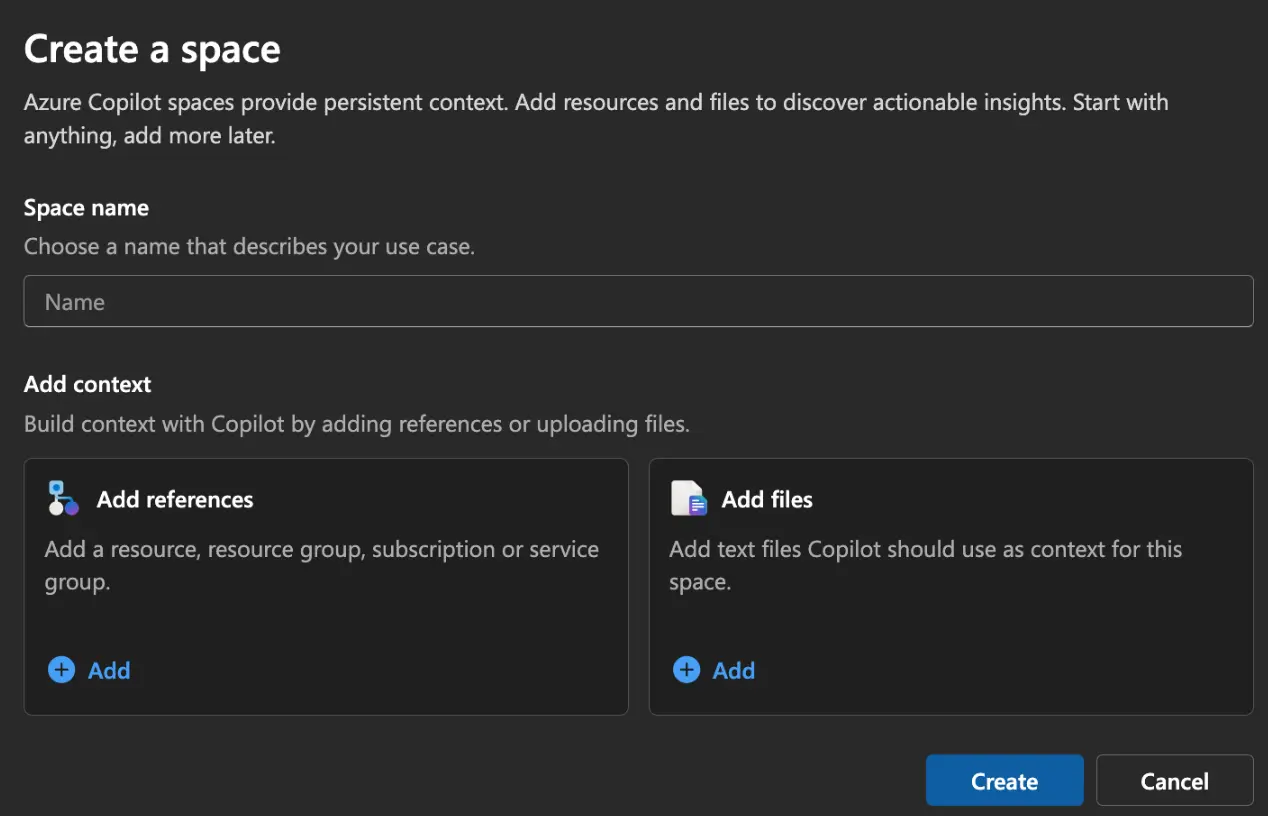
Microsoft describe Spaces as persistent workspaces that bring together Azure resources, files and instructions. The intention is to carry context across conversations.
The creation screen lets you:
- Name the space around the application or environment.
- Add resource references, including resources, resource groups and subscriptions.
- Upload text files to provide additional information.
Does Azure Copilot Cost?
For the standard Copilot experience that I have covered in this post, there is currently no additional charge. However, the pricing position varies across the wider experience.
- Azure Copilot: Microsoft currently list its current capabilities at no extra cost, with the exception below.
- Observability Agent: Uses consumption-based billing for activities and investigation.
FUTURE CAPABILITIES MIGHT BE SUBJECT TO PRICING
Microsoft mention, in a single line that future Copilot capabilities may be subject to pricing. Before relying on Azure Copilot, make sure you're aware of any potential pricing changes.
On the pricing side of things, I will be watching this intently. For MSPs, predictable pricing matters when deciding how capabilities fit into managed services. The standard experience currently gives you the platform to test it without additional charges!
Hands-On with the Standard Copilot Agent
For this first look, I focussed on two typical Azure tasks:
- Investigating the cost of a VM and its associated resources.
- Inspecting NSG rules, then asking for a security recommendation.
Both tests used the standard Copilot agent, on the new harness. Future content is coming on the other agents. (I did have a draft post around the other agents - but on the old harness, so give me some time to re-test the specialised agents!)
Investigating VM Costs
I started with the following question:
What is the cost of vm-migrate-002 and its associated resources for the month of October 2026?
The associated resources matter here. I wanted Copilot to investigate the resources connected to the VM and include their costs in the answer.
The new experience showed its progress:
- It identified the relevant VM and associated resources.
- It reported finding the attached disk, NIC, NSG and public IP.
- It called "arm-query_costs" to retrieve the costs for the requested period.
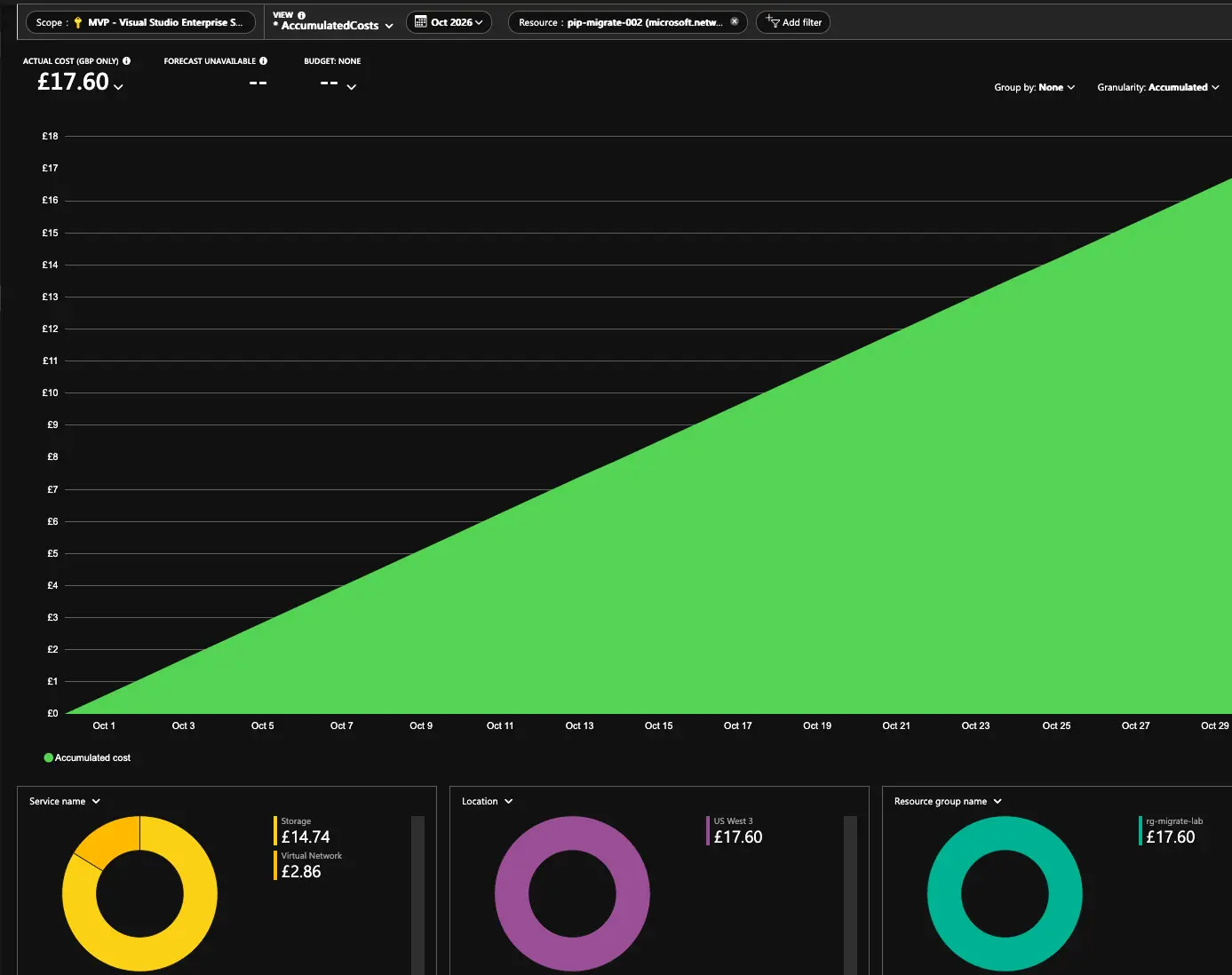
The returned billable breakdown was then: £17.60.
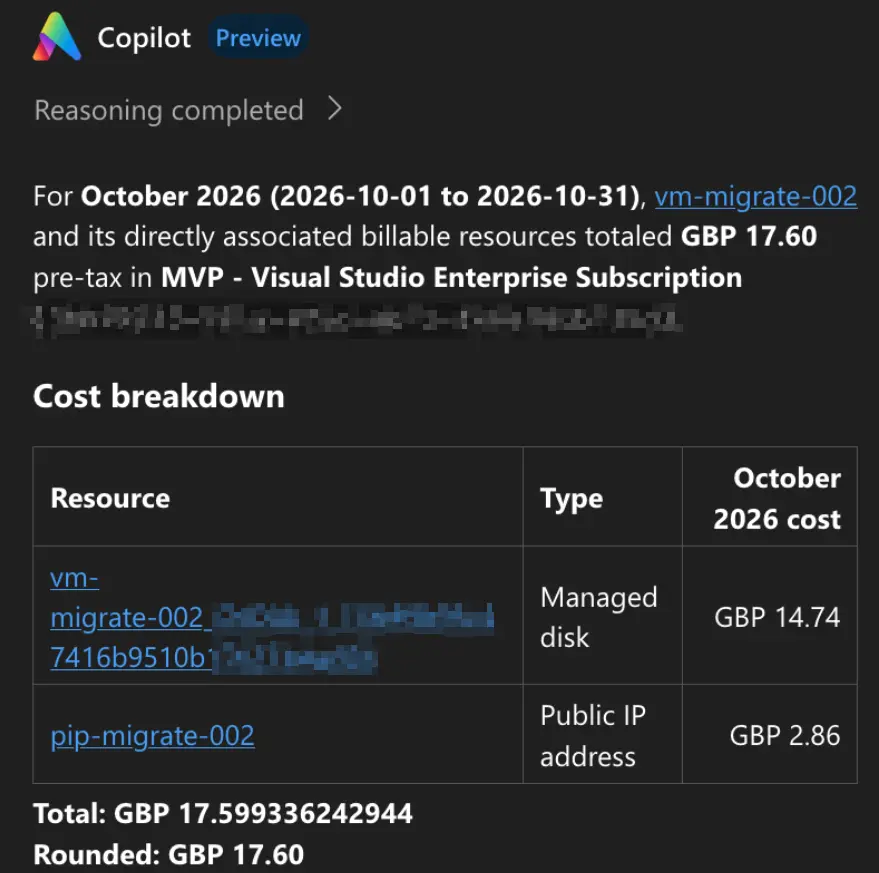
I then checked this against Azure Cost Analysis and it was correct!
The Same Question in the Previous Experience
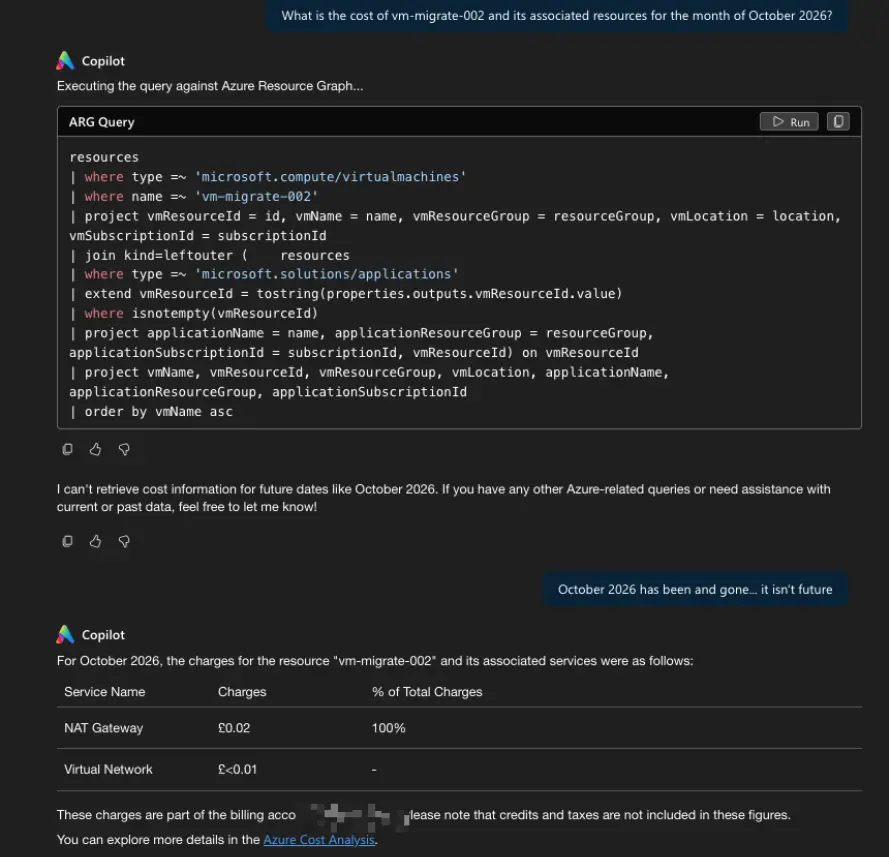
I then put the same cost question to the previous experience. This produced quite a different result!
Firstly, it told me that October 2026 was a future date. And I tested this recently, in November - so I had to correct it.
It then produced cost information for a NAT Gateway and a Virtual Network! Totally wrong.. so points to the new experience here.
Inspecting NSG Rules
Next, I asked:
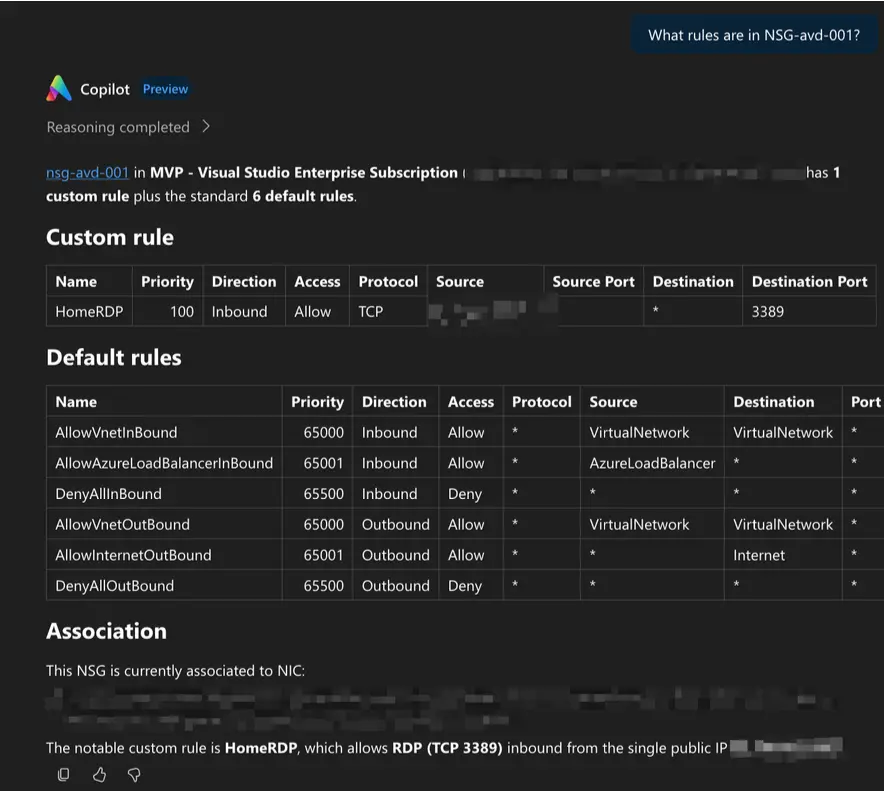
What rules are in nsg-avd-001?
Copilot then returned the custom rule alongside the six default rules. It also identified the NIC association.
The custom rule, HomeRDP, allowed inbound TCP traffic on port 3389 from a single source IP. The response included priority, direction, source and destination details.
I then followed up with:
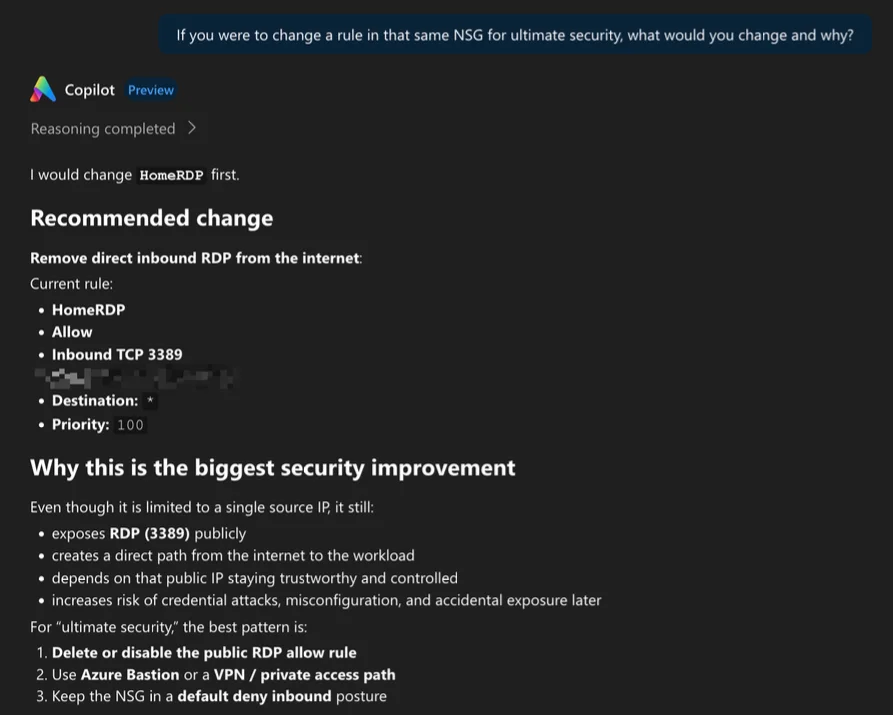
If you were to change a rule in that NSG for ultimate security, what would you recommend?
Copilot retained the context and selected HomeRDP. It recommended removing direct public RDP access and using an alternative access path.
It did though, recognise that the existing rule is restricted to a single IP, determining mitigating factors.
What This Means for MSPs & IT Teams
These tests show some practical value for teams managing Azure environments. Copilot can investigate resources, retrieve information and carry context into a follow-up discussion.
Three key areas I see Copilot helping teams today:
- Cost Investigations: Asking about a VM and its associated resources to produce a breakdown of costs. Copilot gives us that starting point to analyse cost.
- Config Reviews: The NSG example shows rules and resource association into a single response. I could push further and ask about improvements and have changes implemented.
- Understanding the investigation: Visible tool calls give me information about what Copilot is looking at and how it approached the request. That can help upskill engineers, and changes the operating model of Azure to AI+engineer, as opposed to engineer+AI.
Where Does This Fit Operationally?
For IT teams and MSPs, Copilot could provide a useful starting point for cost investigations and configuration reviews. Engineers still need to verify the findings before using them in customer recommendations.
9to5Azure Comment: Pressure on Third-Parties? FinOps Tools Especially!
This raises an interesting question for third-party FinOps vendors. If agents can reliably investigate costs, explain optimisation opportunities and produce this across tenants; then it's harder to justify third-party tools.
What Still Needs Clarifying
For me, a few questions remain - so over to you, Microsoft.
- Models: Clarification on which models are powering these experiences. And how do we opt to have deeper reasoning.
- Pricing: Do we expect these capabilities to cost soon? Especially if they are on the GitHub Copilot harness?
- MSP Access: How can MSPs leverage these Agents at scale, across Lighthouse for example?
- Operational Controls: How do approvals and audit records behave when making changes?
Wrap Up: A More Useful Azure Copilot?
Based on these tests, yes! The new experience returned a cost breakdown that matched Cost Analysis. It also retained NSG context when I asked for security recommendations.
The visible tool calls made investigation easy to follow. It definitely feels like a more mature Copilot experience, with value worth exploring.
Let me know if you need help getting access to these agents, what future content around them you'd like to see - or if you have general thoughts by commenting below!
Comments (0)
No comments yet. Your first commenter will appear here.
Leave a comment
Join the discussion
Become a member of 9to5Azure to start commenting.
Already a member? Sign in