


TL;DR
- Default Outbound Internet Access is being removed for new Azure subnets from March 31st 2026.
- Workloads will require explicit outbound connectivity using services such as NAT Gateway.
- NAT Gateway is the recommended solution due to scalability, simplicity and stable Outbound IP addressing.
- Existing environments are not impacted, but new deployments must adopt a new explicit outbound design.
Introduction
Azure Networking has historically allowed virtual machines and other resources to reach the internet even when no explicit outbound connectivity had been configured. This behaviour known as Default Outbound Access, relied on platform-managed SNAT within the Microsoft backbone.
From March 31st 2026, Microsoft is removing Default Outbound Access
Newly created subnets will be private by default and will no longer receive outbound internet access automatically. Workloads that require internet connectivity will need explicit outbound access, such as NAT Gateway, Load Balancer, Public IP Address or third-party NVAs.
This blog post has you covered, and I will outline what is changing, the impact and why NAT Gateway is the preferred choice when stacked up against the rest.
What’s Changing - From Tech to Impact
For many years, as far as I can remember, Azure has provided outbound internet access to virtual machines even when no explicit architecture had been configured.
This behaviour is known as Default Outbound Access and it allowed workloads to communicate with the internet using Microsoft-managed SNAT.
Microsoft are removing this behaviour, soon. From 31st March 2026, newly created subnets will be configured as private by default, meaning workloads will not be able to access the internet by default.
If your services require outbound communication, an explicit outbound service will need to be configured.
What Default Outbound Access Is
Default Outbound Access allows Azure compute resources to initiate outbound internet connections without requiring a Public IP address, NAT Gateway or other outbound configuration.
Under this model, Microsoft handles the outbound connectivity and it is available by default.
Key Characteristics of Default Outbound Access
- No Public IP Address is required on a VM.
- The outbound IP address may change.
- Architecture is implicit rather than intentionally designed.
Due to this, outbound internet connectivity has been the default, and “just works”.
Why Microsoft Is Removing It
Microsoft is removing Default Outbound Access to encourage more secure and predictable networking architectures.
Or, is this a strategic way to generate a touch more revenue per environment?
Several limitations exist within the current model:
- Unpredictable outbound IP addresses can cause downtime and issues with App Services in particular.
- Implicit connectivity means workloads have internet access which may not have been intentionally designed.
- Weaker security posture for compute services.
Note
This change aligns Azure networking with modern cloud architecture practices where outbound connectivity must be intentionally designed and configured rather than automatically provided.
What a Private Subnet Means
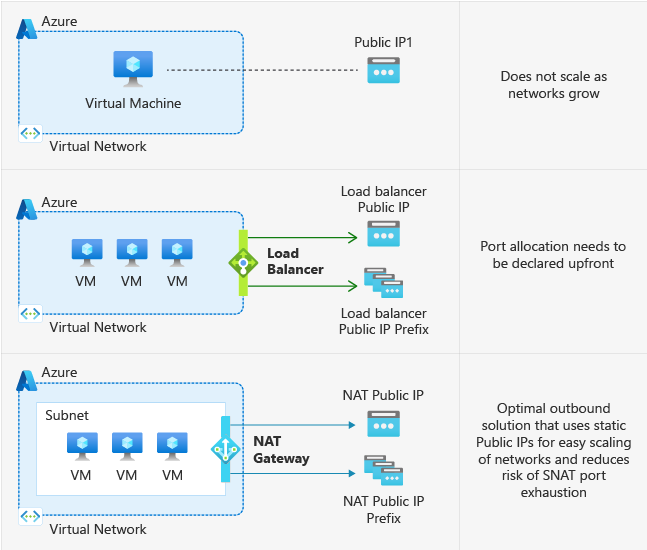
A private subnet is a subnet where defaultOutboundAccess is disabled. This prevents Azure from assigning a default outbound public IP. Outbound connectivity still works, but only via an explicitly configured service.
When a subnet is Private:
- Azure does not provide automatic outbound access.
- Workloads cannot reach the internet unless an outbound service is configured.
| Outbound Option | Description |
|---|---|
| NAT Gateway | Dedicated outbound SNAT service with static public IP and high scale |
| Load Balancer (Outbound Rules) | Provides outbound SNAT via backend pool association |
| Azure Firewall | Adds outbound connectivity with traffic inspection and policy control |
| Network Virtual Appliance (NVA) | Third-party firewall or routing appliance providing outbound access |
Tip
NAT Gateway is the service Microsoft recommends for most outbound connectivity scenarios. We will come onto why, including a real-world example later on.
BREAKING CHANGE - Impact On New Deployments
For new subnets created after March 31st 2026, outbound internet will not work unless it has been deliberately configured.
MSPs and IT Teams deploying new workloads will need to design outbound connectivity as part of the wider architecture.
Typical approaches include:
- Attaching a NAT Gateway to the subnet.
- Using Load Balancer outbound rules.
- Routing outbound traffic through Azure Firewall or a third-party NVA.
- The worst option, a Public IP address assigned to the resource.
Without one of these in place, resources will not connect to external endpoints!
Warning
Private subnet behaviour is controlled by the
defaultOutboundAccessproperty. After March 31st 2026, this defaults tofalsefor new VNets using updated API versions. Infrastructure-as-Code deployments may behave differently depending on API version, so this setting should be explicitly defined in templates.
Impact On Landing Zone Templates
Infrastructure-as-Code templates that deploy Azure Landing Zones may require updates.
Templates that used to rely on explicit outbound internet access will need to include specific resources e.g. NAT Gateway.
Warning
Automated environment deployments that previously relied on Default Outbound Access will fail to reach external services unless outbound access is explicitly configured.
Impact on Existing Resources
Existing VNets and Subnets will not automatically change behaviour on March 31st 2026.
Workloads currently relying on Default Outbound Access will continue functioning unless the subnet is re-deployed/re-created.
NAT Gateway vs Load Balancer
With a Notable Remark on Azure Firewalls and NVAs
Designing outbound connectivity in Azure now requires a deliberate choice. Several services can provide outbound access, but they serve different purposes and operate at different layers.
Easy comparison table at the end of this section!
At a high-level:
- NAT Gateway is purpose-built for outbound SNAT at scale.
- Load Balancer outbound rules provide basic outbound SNAT tied to compute workloads.
- Azure Firewall introduces security inspection alongside outbound access, for a price.
- NVAs provide third-party firewall and routing capabilities with additional operational overhead.
NAT Gateway
NAT Gateway is a dedicated outbound connectivity service designed to provide scalable and reliable outbound IP addressing at a subnet level.
Key characteristics:
- Outbound access only.
- Static Public IP or Prefix.
- Applies to all resources within a subnet.
- Fully managed with little infrastructure overhead.
Tip
This is the recommended approach from Microsoft for most outbound connectivity scenarios.
Load Balancer (Outbound Rules)
A Standard Load Balancer can provide outbound connectivity using outbound rules, but this isn’t its primary function.
Key characteristics:
- Designed primarily for inbound load balancing!
- Outbound SNAT is a secondary capability
- Requires backend pool association.
Azure Firewall
Azure Firewall provides outbound connectivity alongside security inspection and policy enforcement.
Key characteristics:
- Provides firewalling and routing capabilities.
- Layer 3 to Layer 7 filtering.
- FQDN-based rules.
- Threat-Intelligence based filtering.
Note
Azure Firewall is not a direct alternative to NAT Gateway - it’s like comparing apples to oranges. Azure Firewall provides network perimeter security, and it comes at a cost!
Third-party NVA - WatchGuard Example
A WatchGuard Firebox Small represents a typical third-party NVA deployment in Azure.
Key characteristics:
- Provides firewalling and routing capabilities.
- Lower base cost compared to Azure Firewall.
- Requires VM deployment and lifecycle management.
Warning
NVAs such as a WatchGuard Firebox Small can introduce a single point of failure. Native clustering capabilities differ from on-premises deployments.
| Capability | NAT Gateway | Load Balancer (Outbound) | Azure Firewall | WatchGuard Firebox Small (NVA) |
|---|---|---|---|---|
| Primary purpose | Outbound SNAT | Inbound Load Balancing | Firewall + Outbound | Firewall + Outbound |
| Inbound support | No | Yes | Yes | Yes |
| Outbound connectivity | Yes | Yes | Yes | Yes |
| Static outbound IP | Yes | Yes | Yes | Yes |
| Traffic inspection | No | No | Yes | Yes |
| SNAT scale | High | Limited | High | Depends on VM size |
| Operational overhead | Low | Low | Medium | High |
| Approx monthly cost (w/ 100 GB egress) | ~£30.30 | ~£16.55 | ~£675 | ~£64.70 |
Note
Pricing is approximate and based on UK South estimates from the Azure Pricing Calculator. Regional pricing and capacity constraints may vary. The total amounts also include a Public IP Address.
Tip
Standard and StandardV2 NAT Gateway are priced the same. StandardV2 should be the default choice where your resources are supported.
App Service Plan Outbound IP Stability
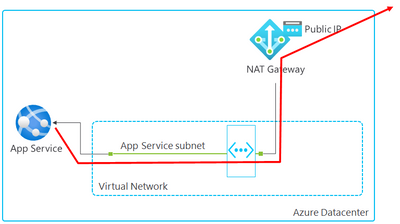
App Services use shared infrastructure within an App Service Plan. As a result, App Service outbound IP addresses can change if a plan is changed. Trust me, I’ve done this, and caused downtime!
When an App Service Plan is integrated with a VNet, and the subnet is associated with a NAT Gateway, outbound traffic will use the NAT Gateway public IP instead.
This provides a stable and predictable outbound IP address & allows you to change the App Service Plan without fear of downtime!
Architectural Positioning
For outbound connectivity design:
- Use NAT Gateway for most compute workloads requiring internet access.
- Avoid relying on Load Balancer outbound rules if you’re not distributing inbound load.
- Use Azure Firewall or an NVA when traffic requires inspection, or to provide support for inbound connectivity.
NAT Gateway v1 vs. v2
Azure NAT Gateway now has two SKUs: Standard (v1) and Standard (v2). While both provide outbound connectivity, Standard V2 introduces improvements across resilience, scale and feature capability.
| Capability | Standard (V1) | Standard (V2) |
|---|---|---|
| Availability zones | Zonal or non-zonal | Zone-redundant by default |
| Throughput | Up to 50 Gbps | Up to 100 Gbps |
| IPv6 support | No | Yes |
| Flow logs | No | Yes (via Azure Monitor) |
| Public IP requirement | Standard Public IP | Standard Public IP V2 |
| App Service support | Yes | Not currently supported |
| Migration path | N/A | Requires redeployment |
Warning
Standard V2 NAT Gateway provides built-in zone redundancy and increased throughput at a great price point, making it the preferred choice. The only concern I have at the time of writing is the App Service support - but this will come soon!
Configuring a NAT Gateway
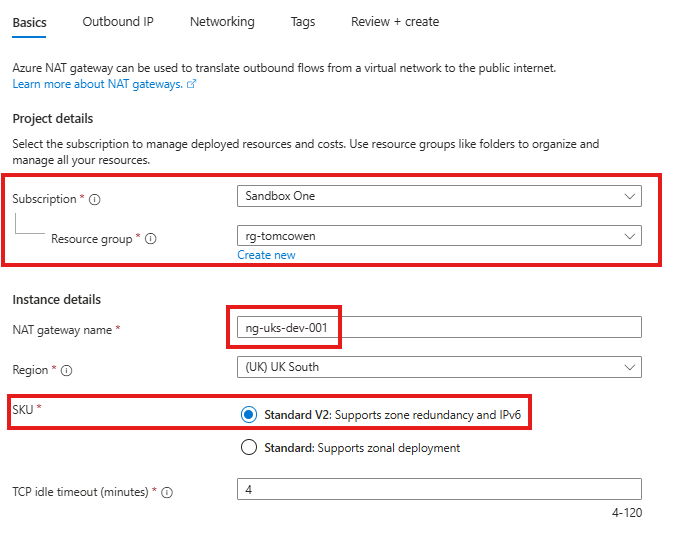
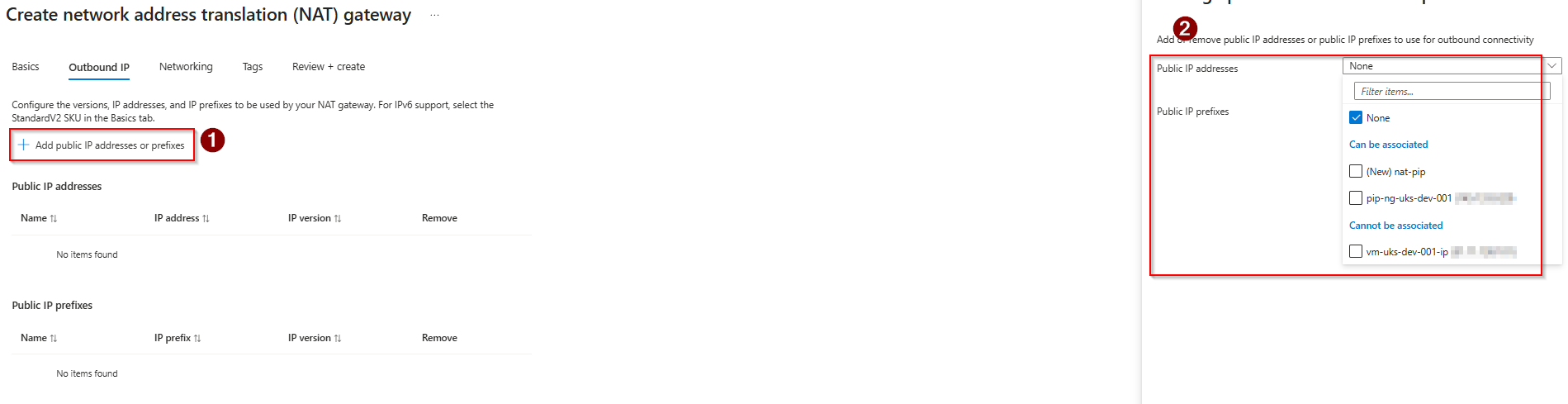
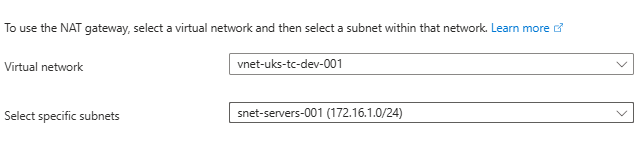
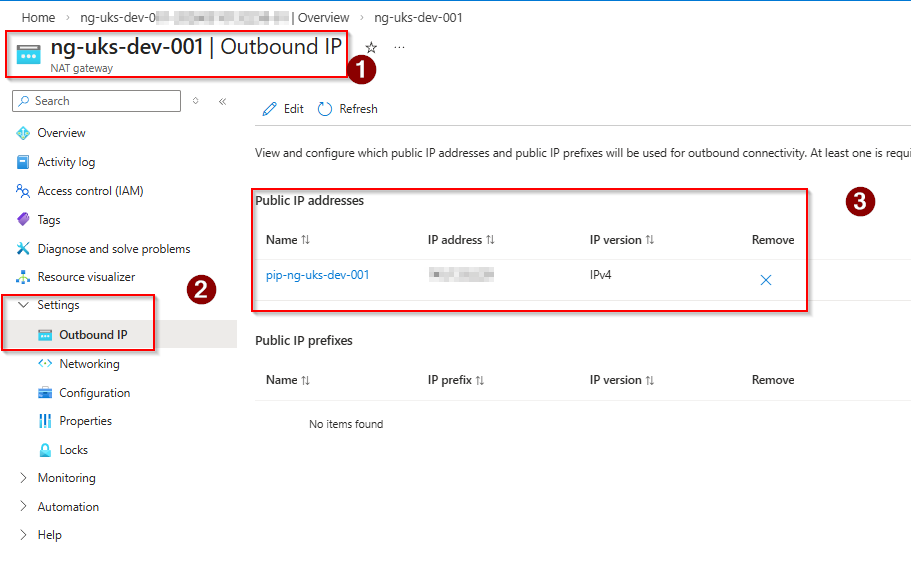
Below is a step-by-step guide on how to deploy a NAT Gateway with some images to help!
- Navigate to the Azure Portal and search for NAT Gateway.
- Select Create and configure the basic settings:
- Subscription
- Resource Group
- Name (aligned to convention and CAF)
- Region
- SKU (Standard or Standard V2)
- In the Outbound IP section:
- Select Public IP address or Public IP prefix
- Create or select an existing public IP resource
- Ensure the public IP is Standard SKU
- In the Subnet section:
- Select the required Virtual Network
- Choose the existing subnet you want to associate with the NAT Gateway
- Review configuration and select Create to deploy the NAT Gateway.
- Once deployment completes, validate the configuration:
- Navigate to the NAT Gateway resource and confirm the required subnet is listed under the subnets.
- Use a VM or workload within the subnet and confirm outbound internet connectivity is working.
- Check Public IP from resource if possible to validate NAT Gateway IP is used.
Tip
- NAT Gateway is applied at the subnet level, not per resource/VNet.
- All resources within a subnet will use the NAT Gateway for outbound traffic.
- NAT Gateway provides outbound connectivity only, and not inbound connectivity.
- No changes are required on the workload once the subnet association is in place.
Real-World Use Cases
The removal of Default Outbound Access forces outbound connectivity to become an intentional design decision. NAT Gateway becomes the standard approach where workloads require internet access, but should not be exposed to inbound connectivity.
Azure Virtual Desktop
Azure Virtual Desktop session hosts require consistent outbound connectivity to operate correctly.
This includes:
- Microsoft service endpoints.
- Identity services (Entra ID).
- Windows Updates.
Session hosts do not require inbound internet access, making NAT Gateway the appropriate design.
Without explicit outbound connectivity:
- Session hosts may fail to register.
- User sign-in issues can occur.
- Updates / installations may fail.
Windows 365
Windows 365 introduces two outbound design options depending on architecture.
- Microsoft Hosted Network
- Microsoft manages the outbound connectivity.
- Simplified deployment.
- Limited control over networking.
- Azure Network Connection (ANC)
- Cloud PCs are deployed into a customer/partner-managed VNet.
- Requires explicit outbound connectivity.
Tip
When using ANC - NAT Gateway becomes the recommended outbound method, providing a consistent public IP and enabling integration with Azure networking.
Why Microsoft Are Making This Change
Default Outbound Access was not intended to be the long-term networking model. Yes, it provided convenience, but introduced several challenges that conflict with modern cloud design standards.
Lack of Predictability
Default Outbound Access uses a shared platform which means:
- Outbound IP addresses are not fixed.
- IPs can change without notice.
- External systems cannot reliably allow-list Azure workloads.
This creates operational risk and presents potential downtime.
Limited Scalability
Default Outbound Access relies on a shared pool of SNAT ports.
When used at scale, this can lead to:
- SNAT port exhaustion.
- Intermittent outbound connectivity failures.
- Degraded application performance.
Note
In practice, I’ve not seen unexpected issues with using the Default Outbound Access; but at an enterprise-level, it may be more widely seen.
Security & Exposure
Implicit outbound connectivity means workloads can reach the internet without it being factored into designs.
This then introduces:
- Unintended internet access.
- Reduced visibility of egress traffic.
- Weaker control over outbound paths.
Migration Guidance for Existing Environments - BREAKING CHANGE
There is no in-place upgrade from Standard V1 to Standard V2. Migration requires a new deployment of a Standard V2 NAT Gateway.
Steps:
- Deploy a new Standard V2 NAT Gateway in the same region.
- Create or select a Standard V2 Public IP or Public IP Prefix.
- Disassociate the subnet from the existing NAT Gateway.
- Associate the subnet with the new Standard V2 NAT Gateway.
- Validate outbound connectivity and confirm IP address usage.
Warning
Public IP resources are SKU-specific. A Standard Public IP used with NAT Gateway V1 cannot be directly reused with Standard V2 and must be re-created and replaced.
Wrap Up
The removal of Default Outbound Access marks a shift towards more deliberate and secure Azure networking design. Outbound connectivity is no longer implicit and must be explicitly defined as part of the architecture.
NAT Gateway becomes the standard approach, providing scalable outbound access with predictable IP addressing and minimal admin overhead.

Comments (0)
No comments yet. Your first commenter will appear here.
Leave a comment
Join the discussion
Become a member of 9to5Azure to start commenting.
Already a member? Sign in