


In Summary - TL;DR
- Shortpath Recap: Direct UDP path delivers performance, but relies on a single transport.
- Multipath Explained: Keeps TCP and UDP active in parallel for speed plus reliability.
- Both Solutions Together: Multipath enhances Shortpath, creating a dual-channel connection.
- Why It Matters: Better user experience, reduced support tickets, and easy to enable.
Introduction
Connection drops and stuttering sessions are still one of the biggest complaints with Azure Virtual Desktop. Even with RDP Shortpath enabled, a single network path can leave users exposed to unreliable Wi-Fi, weak cellular signal, or congested networks.
RDP Multipath changes that by keeping both TCP and UDP channels active, allowing the session to change dynamically for performance and reliability. In this blog post, I will explain how it works, how it compares with Shortpath, and how you can enable it in your own environment!
Ready to see the next step in AVD connectivity? Let’s dive in. ⚡
A Quick Recap: RDP Shortpath
Azure Virtual Desktop originally relied on a TCP-based connection for RDP sessions. This approach was reliable but could introduce latency, lag, and congestion for user sessions. RDP Shortpath improves this by creating a direct UDP connection between the client and the session host, bypassing the AVD Gateway when possible.
Shortpath provides a faster and more responsive session, to the detriment of potential unreliability of a UDP-based connection.
👉Want to learn more about RDP Shortpath? I wrote a blog article on this tech specifically!
 RDP Shortpath Explained: The Key to Faster, More Reliable AVD SessionsRead article
What is RDP Multipath?
RDP Multipath is a feature that Microsoft recently released, for Azure Virtual Desktop connectivity. Instead of relying on a single transport path, it keeps both TCP and UDP channels active at the same time.
This means AVD sessions can dynamically use the best available route depending on network conditions, improving both performance and reliability. In practice, users see fewer frozen screens, faster recovery from a network issue, and a smoother experience in general. This can also mean less calls to your support teams.
To enable RDP Multipath, there are a few pre-requisites that you need to meet:
- App Versions: Connections must be from a local Windows device using Windows App, version 2.0.559.0 or later, or the Remote Desktop client, version 1.2.6353 or later
- RDP Shortpath: Ensure RDP Shortpath has been configured.RDP Shortpath Explained: The Key to Faster, More Reliable AVD SessionsRead article
Once enabled, Multipath works automatically, with no need to change your network configuration.
Tip
RDP Multipath builds on the performance gains of UDP by adding the reliability of TCP as a live fallback. It’s designed for real-world networks where conditions are rarely perfect.
RDP Multipath vs. Shortpath: What's the Difference?
Shortpath gives AVD a direct UDP route to the AVD Session Host(s). That boosts responsiveness but still rides a single transport, potentially causing instability.
Multipath keeps UDP and TCP alive in parallel and dynamically routes traffic. Meaning your customers get UDP performance, with a TCP safety net.
| Aspect | RDP Shortpath | RDP Multipath | How it Works | Benefit | Notes |
|---|---|---|---|---|---|
| Transport model | UDP primary | UDP + TCP | Shortpath uses UDP for speed, Multipath keeps TCP active as backup | Performance and resilience | Multipath steers traffic automatically |
| Path setup | STUN/TURN for UDP | Same UDP setup + TCP live | Client negotiates UDP while TCP remains available | Session stability | Switches seamlessly if UDP degrades |
| Main outcome | Low latency | Low latency + reliability | Dynamic choice of channel | Better user experience | Ideal for weak Wi-Fi or 4G |
| Client support | Windows App and Remote Desktop | Windows App 2.0.559.0+ or RD Client 1.2.6353+ | Windows clients only | No extra install | Other OS not yet supported |
| Prerequisites | UDP enabled | Shortpath enabled, supported client | Multipath requires Shortpath | Stacked feature set | Preview may need validation pool |
| Configuration | Listener or STUN/TURN config | Automatic once prerequisites are met | Policy or registry settings | Low admin effort | Registry toggle optional |
| Validation | RDP properties show UDP | RDP properties show Multipath | Check during session | Easy confirmation | Supports runbooks |
| Together | Yes | Yes | Shortpath provides UDP, Multipath adds TCP | Best mix | Complementary features |
| Status | GA | GA July 2025 | Rollout via client updates | Production ready | Plan client upgrades |
Working Together: Shortpath & Multipath
RDP Shortpath and Multipath are not competing features. I have to admit, before I read up on the technology, I thought Multipath was superseding Shortpath!
Shortpath provides the foundation by establishing a direct UDP path between client and session host, giving users a performance boost. Multipath builds on those foundations by keeping a TCP route active in parallel, so the session can fall back instantly if UDP performance drops.
For organisations that already have Shortpath enabled, Multipath is not a replacement, but an enhancement. It turns Shortpath from a single high-performance path into a dual-channel connection that blends speed with resilience.
Tip
Multipath depends on Shortpath, but together they deliver the best of both worlds: the speed of UDP and the safety net of TCP.
How To Enable RDP Multipath
Multipath is in GA, since July 2025 - will be enabled by default when the pre-requisites are met. Having issues at the moment - read on.
The good news is that enabling RDP Multipath is straightforward. As long as RDP Shortpath has already been configured, and working, Multipath is too.
RDP Shortpath Explained: The Key to Faster, More Reliable AVD SessionsRead article
Validating RDP Multipath Is Working
The easiest way to confirm that RDP Multipath is active is directly from the client. While connected to an Azure Virtual Desktop session, open the connection bar and select the information icon. Under connection details you should see RDP Multipath: Enabled.
Tip
For administrators, Azure Virtual Desktop Insights can also display connection reliability information, but for most scenarios the client connection bar is the quickest validation.
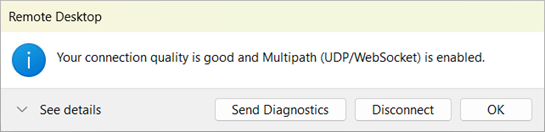
Credit: Microsoft
Beyond The Tech - Why Multipath Matters
Here are some reasons Multipath deserves some attention, and why in my opinion, it should be a standard.
- Resilience vs Performance: Performance is easy to sell, but resilience is what prevents disruption. Multipath ensures users get both.
- Supports BYOD & Variable Networks: From home Wi-Fi to 4/5G hotspots, Multipath provides stability where single-path UDP would struggle.
- The Cost of Poor User Experience: Dropped sessions lead to wasted time and support tickets. Multipath reduces this operational drag, lowering costs and improving perception of IT.
- Proactiveness to Customers: For managed service providers, enabling Multipath is a chance to show value. Proactively rolling it out, with no additional cost, positions your service as forward-thinking and customer-centric.
Final Thoughts
RDP Multipath is a quiet but important change to how Azure Virtual Desktop handles connectivity. Where Shortpath gave us speed, Multipath adds resilience, ensuring users have a smoother experience across networks.
For IT teams, it’s a low-effort change with a high impact. For service providers, it’s a proactive way to add value without new licensing or infrastructure. And for end-users, it means fewer freezes, fewer dropped calls, and a desktop that just works.
Multipath should not be seen as optional. It is the natural next step in building a reliable, enterprise-ready AVD environment.
Comments (0)
No comments yet. Your first commenter will appear here.
Leave a comment
Join the discussion
Become a member of 9to5Azure to start commenting.
Already a member? Sign in