


TL;DR
- Regional host pools reduce cross region dependency by aligning host pool metadata to the Azure region where the session hosts run.
- Regional host pools improve resilience but do not protect against poor architecture, configuration or setup.
- Recent host pool default changes improve security, particularly around redirected devices.
- MSPs and IT teams should focus on getting the basics right, with regional host pools complimenting environments.
Introduction
Azure Virtual Desktop continues to evolve, with recent changes including updates to host pool defaults and the introduction of regional host pools. This marks a step forward in how Azure Virtual Desktop stores and manages host pool metadata and signals a clear shift in Microsoft’s long-term direction for the service.
Until now, host pools have relied on a geographical model, where multiple Azure regions share a common backend. While this approach works in most scenarios, it introduces a wider blast radius during service issues and can create dependencies on infrastructure outside the region where session hosts are running. Regional host pools are Microsoft’s answer to this challenge.
In this post, I will cover what regional host pools are, how they differ from the existing model, and why Microsoft are positioning them as the future default for Azure Virtual Desktop. I will also touch on the recent host pool default changes and outline the best practices that still matter.
Let's go! 🏊
Host Pools: The Core of Azure Virtual Desktop (One of!)
I've already covered the basics of Host Pools as part of the core building blocks for AVD - so I'm not going to reinvent the wheel here, I'll just re-share the previous section.
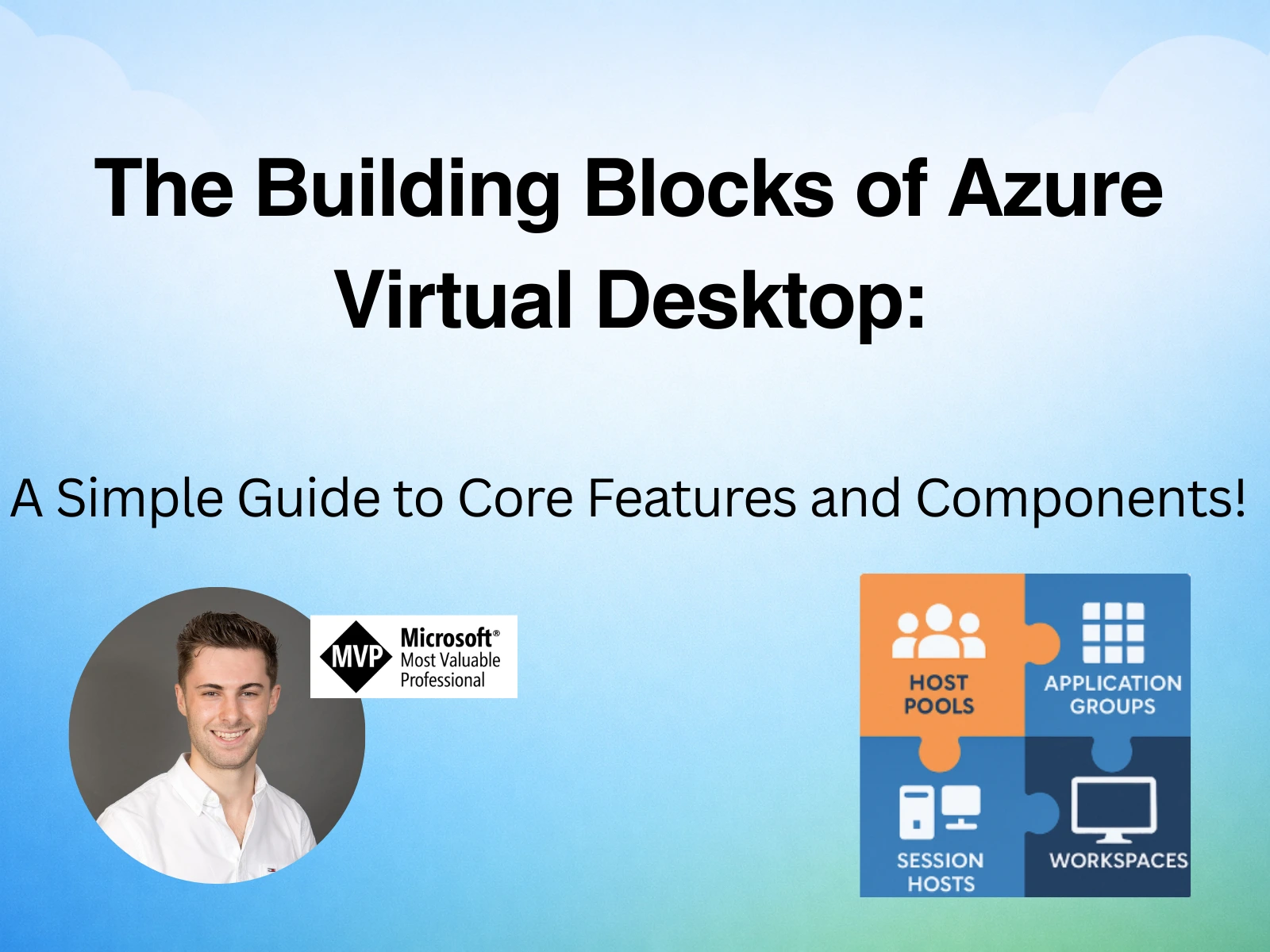 The Building Blocks of Azure Virtual Desktop: A Simple Guide to Core Features and Components!Read article
Host Pools are a key part of an AVD environment, acting as collections of virtual machines that deliver desktops and/or applications to users. Choosing the right load-balancing mode impacts both scalability and cost-efficiency.
- Breadth-First – Spreads users evenly across available session hosts, improving performance but requiring more active resources.
- Depth-First – Fills up one host before moving to the next, maximising resource usage and reducing costs.
Tip
For SMB customers, auto-scaling can strike the perfect balance – ensuring performance during peak hours while reducing costs when demand is low.
Regional Host Pools Explained
Regional Host Pools change where AVD stores and manages host pool metadata. Instead of relying on a shared, geography wide backend, metadata is now hosted directly in the Azure region where the host pool is deployed.
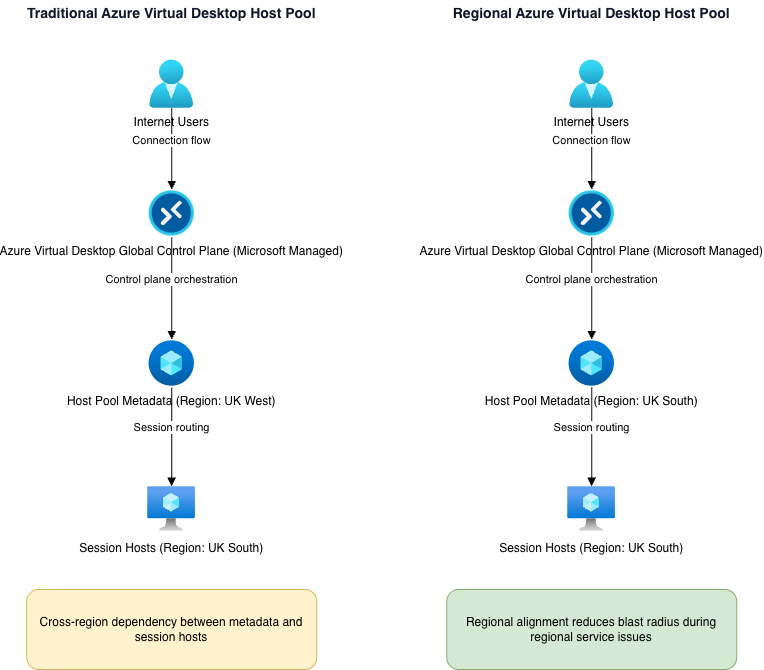
So what does this mean? With the traditional host pool model, say your session hosts are deployed in UK South; with the host pool metadata stored in UK West.
If UK West experiences a service issue, user connections may be impacted even though the session hosts in UK South are healthy.
Regional host pools remove this cross-region dependency. With a regional host pool, only service issues affecting the region where the host pool is deployed can impact connectivity/performance.
Key Differences to traditional host pools:
- Metadata is stored in the same Azure region as the host pool.
- Reduced blast radius during service outages.
- Improved alignment to data residency requirements.
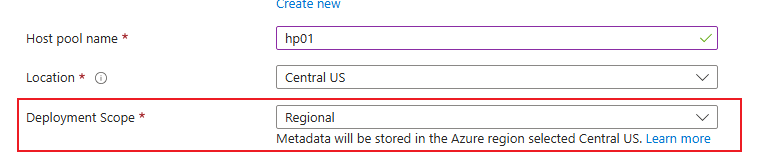
How the new deployment scope of the regional host pools Credit to Microsoft for the image.
Note
Thanks to Simon Kurtz of Microsoft for the integration between Github Copilot and Draw.io for diagram generation!
Regional Host Pools are currently in public preview so while they present a good opportunity, I would suggest holding off until Microsoft release this entirely. There are currently some fairly big limitations with this, which may impact standard deployments:
- Automated host pools with session host update.
- Private link.
- Dynamic autoscaling.
- App Attach.
The Future of Regional Host Pools
Microsoft have confirmed that they are working on a future service that will enable the migration between existing host pools and regional host pools. This will likely come when the service goes fully GA.
It's not yet confirmed (from what I can find) whether regional host pools will become the default; but my guess is that they will.
Control Plane vs. Data Plane
Azure Virtual Desktop Architecture Layers
Understanding where Regional Host Pools sit in the Azure Virtual Desktop architecture helps clarify what they improve and what they do not.
| Layer | Managed By | Components | Impact of Regional Host Pools |
|---|---|---|---|
| Control Plane | Microsoft | Connection broker, host pool metadata, management APIs, service orchestration | Regional host pools store metadata in the same Azure region as the session hosts, reducing cross-region dependencies and blast radius during service incidents. |
| Data Plane | Customer Azure subscription | Session hosts (VMs), FSLogix profile storage, networking, identity integration | No change. These components remain in the customer’s Azure subscription and must still be architected for resilience and performance. |
| Access Layer | Microsoft | AVD gateways, reverse connect transport, client connectivity endpoints | Unchanged. Connectivity still routes through Microsoft-managed global infrastructure. |
Note
AVD is built across both control and data planes. Microsoft operate the service layer whilst customers manage the compute and storage within their subscriptions.
The Defaults of a Host Pool
Host Pool defaults are easy to overlook as engineers implement them as part of a routine AVD implementation. These settings however play a significant role in the security and behaviour of the virtual desktop environment and may be the answer to some commonly asked questions e.g. my printer isn't showing in the virtual desktop.
Back in April 2025, Microsoft updated several host pool redirection defaults (think clipboard, printer and USB redirection) to align to their secure future initiative. These changes were designed to reduce implicit trust, particularly if sessions/connections are allowed from unmanaged devices.
Note
Remember: When configuring Entra ID joined session hosts, there's a specific RDP property that needs to be set at the Host Pool level, to ensure proper connectivity. This property is targetisaadjoined:i:1.
What Regional Host Pools Do Not Solve
Regional Host Pools undoubtedly improves the resilience of the AVD control plane, but they do not make the environment resilient by default. This is an important thing to consider, as regional host pools do not protect your organisation or customers from:
- Session host failures.
- Inaccurate scaling plans.
- User experience issues caused by FSLogix, server resource or region issues.
If session hosts are unhealthy, overloaded or there is a misconfiguration somewhere with your storage, a regional host pool can still fail.
As I said above, regional host pools limit the blast radius of Microsoft service issues - they do not protect against misconfigurations or region-specific outages. As an MSP or internal IT team, the focus should remain on each core part of AVD, think solid golden images, well-spec'd session hosts and accurate scaling plans.
The Ultimate Host Pool
Regional host pools provide a more resilient design, but only if they are coupled with a well-designed host pool to start with. In this section, I'm going to highlight the settings you as IT teams or MSP leads should care about and why.
This host pool doesn't include the regional flag, as I haven't signed up to the preview in my Azure tenant.
Building The Ultimate Host Pool
| Area | Recommended Setting | Why This Matters |
|---|---|---|
| Host Pool Naming | customername-vdpool-identifier |
Aligns with the Cloud Adoption Framework and keeps host pools easy to identify and manage at scale. |
| Host Pool Type | Pooled | The most cost-effective and operationally efficient option for the majority of user workloads. |
| Session Host Configuration | Disabled | Session Host Configuration is now generally available - Session Hosts can now be part of an automated lifecycle |
| Load Balancing Algorithm | Breadth-first | Prioritises consistent user experience and avoids uneven host utilisation. |
| Maximum Sessions per Host | ~10 users per VM | A proven baseline that balances performance and cost. Should be validated per workload. |
| Session Host Naming | vm-avd-sh<increment> |
CAF-aligned, predictable and automation-friendly for scaling and lifecycle operations. Remember the host pool appends "-number" to the end of the VM. |
| Azure Region | Closest to users | Reduces latency and improves session responsiveness and overall user experience. |
| Security Type | Trusted Launch (vTPM + Secure Boot) | Provides a strong security baseline with minimal operational impact and should be standard for new builds. |
| Image Source | Golden image | Ensures consistency, predictable performance and faster recovery across session hosts. |
| VM Size | E8s v5 per ~10 users | A cost-effective balance of CPU and memory that performs well for general-purpose workloads. |
| OS Disk Type | Premium SSD | Improves boot times and session stability compared to Standard SSD. |
| Networking | Existing VNet and subnet | Provides control and flexibility for future security and networking enhancements. |
| Directory Services | Entra ID or AD DS | Depends on identity strategy. Entra ID joined is the default direction of travel for new deployments. |
Configuring the Ultimate Host Pool (RDP Properties)
| Configuration Area | Recommended Approach | Security / Operational Rationale |
|---|---|---|
| Clipboard Redirection | Disable local-to-remote clipboard | Reduces data upload risk from unmanaged or non-compliant devices. |
| Drive & Storage Redirection | Disabled | Prevents data exfiltration and limits exposure when sessions are accessed from unmanaged endpoints. |
| USB / Device Redirection | Disabled | Reduces attack surface and prevents uncontrolled device access into the session. |
| Printer Redirection | Disabled | Helps prevent data leakage and avoids common stability and driver-related issues. |
| Entra ID Join Support | targetisaadjoined:i:1 |
Required for reliable connectivity when using Entra ID joined session hosts. |
| Default Redirection Settings | Review and validate defaults | Many defaults have been tightened by Microsoft. Understanding them avoids unnecessary troubleshooting. |
Wrap Up
Regional host pools are a meaningful improvement to Azure Virtual Desktop, but they are not a silver bullet. They strengthen the service foundation and reduce the blast radius of platform-level service issues. However, the day to day reliability of AVD still comes down to how the environment is architected and delivered.
For MSPs and IT teams, I would focus on getting the basics right. Focus on resiliency, security and performance. Regional host pools are great; but only compliment a well-designed AVD environment from the outset.
Feel free to reach me on LinkedIn if you have questions, or down in the comment section of the blog.
Comments (0)
No comments yet. Your first commenter will appear here.
Leave a comment
Join the discussion
Become a member of 9to5Azure to start commenting.
Already a member? Sign in